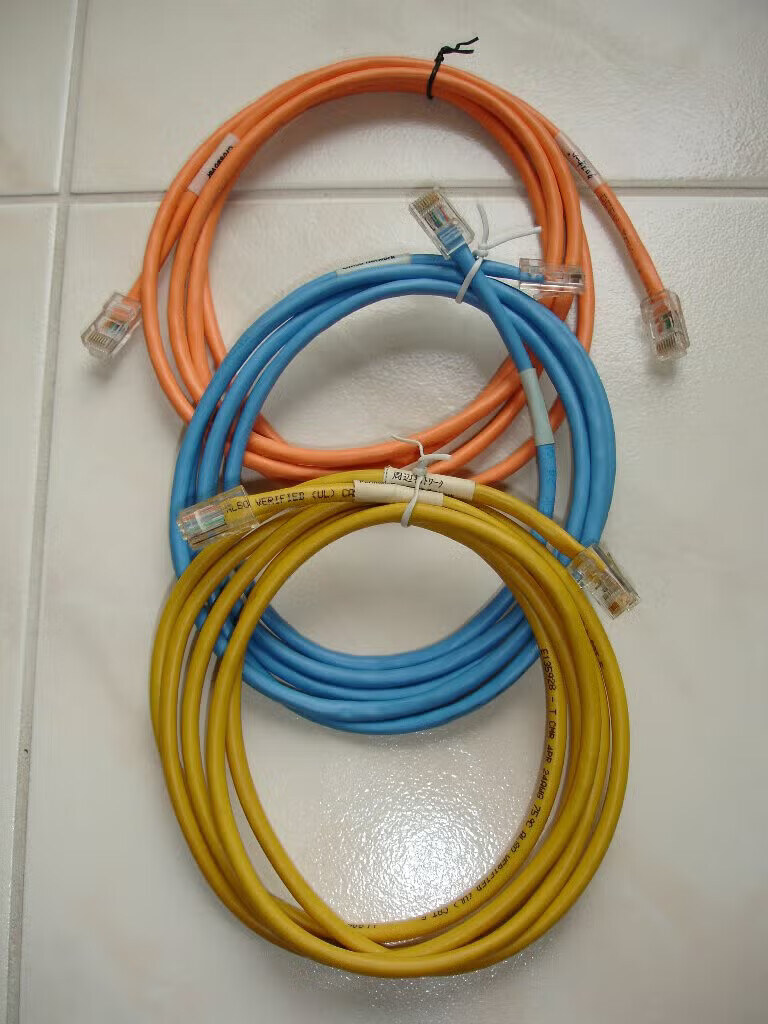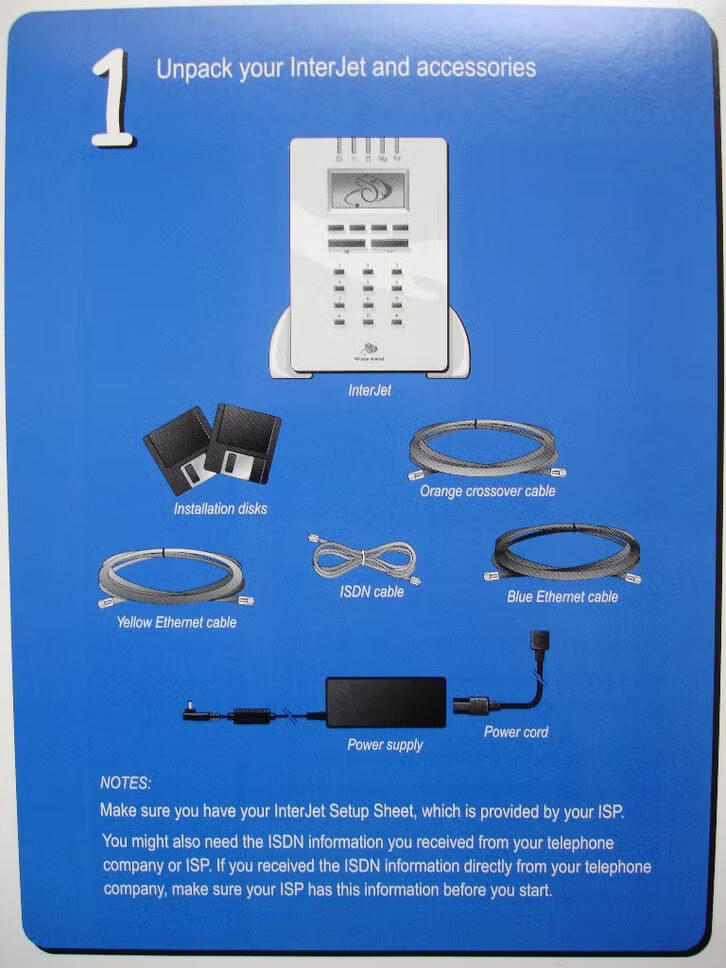
Whistle shipped each InterJet with color-coded 10BASE-T cables, and its guides tell you which color to use for each job. This page collects what is known about them, so a missing cable can be replaced with a close match. It is drawn from Whistle's Administrator's Guides and setup card, and from one complete set that came with an InterJet 140 in the Netherlands, photographed by its owner, Tim de Brie.
Which cables a unit came with depends on its network card (Models). The 100, 120 and 130 have a four-port hub card; the 140 and 200 have a dual-Ethernet card, one Office port and one Perimeter port.
| Cable | Kind | Shipped with | Used for |
|---|---|---|---|
| Blue, labeled "Office Network" | straight-through | every model documented | the internal (office) network |
| Yellow, labeled "Perimeter Network" | straight-through | dual-Ethernet models (140, 200) | the Perimeter port: the public network, for servers reachable from outside |
| Orange, labeled "Crossover" | crossover | every model documented | whichever connection would otherwise join two ports of the same kind |
The guides for the InterJet 100/120 and 200 (WhistleWare 2.0) list the blue and orange cables for the hub-card models, and blue, orange and yellow for the 200, each with a telephone cord for the internal modem. The 140's setup card adds an ISDN cable.
A 10BASE-T link joins a port that transmits on pins 1 and 2 to one that receives on them. A computer's port and a hub's uplink port are wired one way (MDI); a hub's ordinary ports the other (MDI-X). A straight-through cable joins two ports wired differently, and a crossover cable joins two ports wired the same. The InterJet's two network cards are wired differently from each other, which is why the guides give different instructions for each:
| Connecting | Hub card (100, 120, 130) | Dual-Ethernet (140, 200) |
|---|---|---|
| The InterJet acts like | a hub (MDI-X) | a computer (MDI) |
| To one computer | blue | orange crossover |
| To a hub's ordinary port | orange crossover | blue (Office) or yellow (Perimeter) |
| To a hub's uplink port | blue | orange crossover (not in the guides; follows from the wiring) |
The hub-card row comes from the 100/120 guide ("use the blue cable to connect it to a hub card port", and the orange crossover for a hub with no free uplink port) and from the WhistleWare 3 guide's troubleshooting table. The dual-Ethernet row comes from the 200 guide, which uses the orange cable "to connect a computer directly to either of the Ethernet ports".
Today most switches, and many computers, swap the pairs themselves (auto-MDI-X), so either cable usually links. The colors still matter for keeping a set original, and for an old hub or computer that does not. Each port on the dual-Ethernet card has two lights: LNK turns green when the link is good, and POL turns yellow "if the polarity of the cable is reversed", the sign of the two wires of one pair swapped at one end.
Read from the photo above. All three cables look alike apart from the color, so the yellow one's printing is probably typical of the set, but only the yellow one's is legible:
| Jacket legend (yellow) | E135928 - T CMR 4PR 24AWG 75°C ALSO VERIFIED (UL) CAT 5 |
| What it means | UL file E135928; CMR, a riser-rated communications cable; four pairs of 24 AWG wire; rated to 75°C; verified by UL as Category 5 |
| Blue and orange jackets | printed too, in dot-matrix capitals; only fragments are readable, each with a "24" consistent with 24 AWG |
| Plugs | clear 8P8C (RJ-45) modular plugs with no strain-relief boots |
| Pairs | four pairs, all terminated: wires of all four pair colors show through the clear plugs, though 10BASE-T uses only two pairs |
| Labels | white wrap-around labels near the ends, in English and Japanese: "Crossover" and クロスオーバー on the orange, "Perimeter Network" and 周辺ネットワーク on the yellow, "Office Network" on the blue (its Japanese side is not in view) |
| Length | not measured; each is a coil of several turns, in the range of a common 2 to 3 m patch cable. An estimate from the photo, not a measurement |
The Japanese labels on a set sold with a Dutch unit suggest Whistle used one bilingual label stock for every market rather than a Japanese-only one; the InterJet was sold in Japan (The InterJet in Japan). 周辺ネットワーク reads "peripheral network", the term the Models page's sources use for the Perimeter port.
Straight-through (blue and yellow). Through the blue cable's clear plug, the orange pair sits at one edge and the brown pair at the other. Brown is pins 7 and 8 in both wiring standards, so orange at the opposite edge is pins 1 and 2, which is T568B. The yellow plug looks the same, less clearly. That is a reading of a small photo, not a cable tester: treat T568B as likely, not established. Either standard works, provided both ends match.
| Pin | T568B wire | 10BASE-T at a computer (MDI) | Other end |
|---|---|---|---|
| 1 | white/orange | transmit + | 1 |
| 2 | orange | transmit − | 2 |
| 3 | white/green | receive + | 3 |
| 4 | blue | unused | 4 |
| 5 | white/blue | unused | 5 |
| 6 | green | receive − | 6 |
| 7 | white/brown | unused | 7 |
| 8 | brown | unused | 8 |
Crossover (orange). The usual crossover is T568B at one end and T568A at the other, which exchanges the orange and green pairs: pins 1 and 2 at one end land on 3 and 6 at the other. The photo shows green wires in the orange cable's plugs but not their order, so whether the original is wired exactly this way, or crosses only the two pairs 10BASE-T uses, is not established. For an InterJet the two are equivalent.
| Pin, end A (T568B) | Wire | Pin, end B (T568A) |
|---|---|---|
| 1 | white/orange | 3 |
| 2 | orange | 6 |
| 3 | white/green | 1 |
| 6 | green | 2 |
| 4, 5 | blue pair | 4, 5 |
| 7, 8 | brown pair | 7, 8 |
Any working Cat 5 cable connects an InterJet, which runs at 10 Mb/s; this list matters only for a set that should look original.
Neither is in the photo. The 100/120 and 200 guides list "a telephone cord that connects the InterJet to a telephone jack", for the internal modem. The 140's setup card shows a short light-gray "ISDN cable" with a modular plug at each end, for the internal ISDN card (ISDN). The Dutch card has RJ-45 jacks for the European S/T interface, which by standard uses a straight-through eight-position cable carrying its two pairs on pins 3-6 and 4-5. That it is wired this way is the standard, not a measurement of Whistle's cable.
If you have an original cable, a length or a close-up of a plug would settle most of these; please contact me.